Introducing Linkflare: The Universal Bookmark Manager
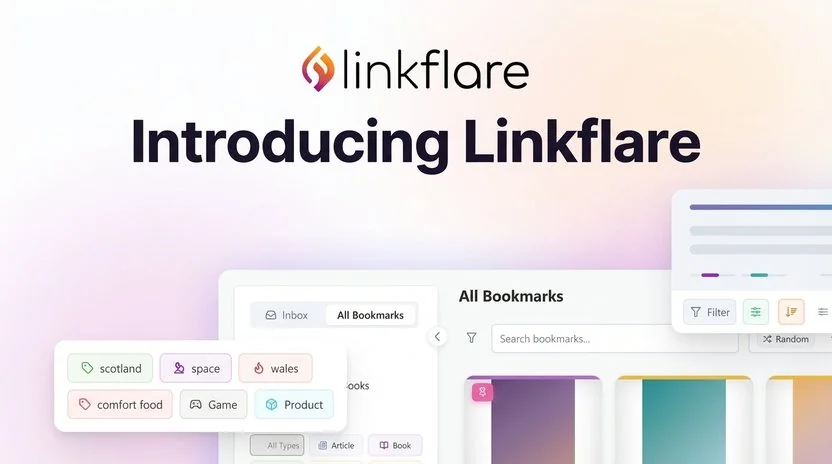
We built Linkflare to solve a problem we all face: remembering everything we find interesting online. You bookmark an article and forget it exists. You save a movie recommendation and it disappears into your browser bookmarks.
The Problem with Traditional Bookmarking
Traditional browser bookmarks are a black hole. You throw things in and they rarely come back out. There's no real organization and no useful search, so they only work for the handful of sites you visit every day.
We found ourselves using a dozen different services:
- Browser bookmarks for websites
- Goodreads for books
- YouTube's "Watch Later" for videos
- Notes apps for recipes
- Separate wishlists on multiple shopping sites
We needed one place to save all of it.
Enter Linkflare: The Universal Bookmark Manager
Linkflare is built on the idea that your brain shouldn't have to hold all of this. Let it think and make connections while the app remembers the links. That's why we call Linkflare your "universal bookmark manager."
Save More Than Links
Linkflare is a universal home for everything you discover online. It recognizes what kind of thing you saved and pulls in the details that go with it:
- Movies & TV Shows: Track what you want to watch. We automatically pull in IMDb ratings, release years, and posters. Perfect for building a movie tracker.
- Books: Keep track of your reading list with automatic author and cover art detection. Use Linkflare as a book tracker to never lose a recommendation again.
- Recipes: Save your favorite meals. We'll even extract cooking times and calorie counts so you can sort by them later. See our Ultimate Recipe Saver guide for the details.
- Videos: Save from YouTube or Vimeo and see the duration right on the card.
- Products: Build a universal wishlist with prices and images from any store.
- Articles: Save long-reads for later.
- Games: Save links or reviews from your favorite gaming sites like gamebrain.co or Steam.
- Places: Plan your trips by saving locations.
Smart Sorting & Organization
We all organize differently. Some people love folders, others prefer tags. Linkflare does both, and a bit more:
- Collections: Group related bookmarks like folders.
- Hierarchical Tags: Create complex taxonomies (e.g.,
#vacation/europe/italy). Searching for "Europe" finds your Italy links automatically. - Smart Filters & Sorting: Filter and sort your movies by IMDb rating, your recipes by cooking time, or your products by price. The filters are context-aware: they change with the type of bookmark you're looking at, so you can always narrow down to the best option.
Automation: Let Linkflare Do the Work
Organization takes time, so we built tools to do it for you. With Automation Rules, you can teach Linkflare how to file your content.
Create a rule that says "If the URL contains 'youtube.com', add the tag #video and move to 'Watch Later'". Or "If it's a Recipe, add the tag #food". After that, the filing happens without you.
A Better Way to Consume Content
Saving is the easy part. Linkflare also helps you get through what you saved.
The Inbox
Linkflare separates the things you want to keep (Bookmarks) from the things you still need to process (Inbox). Throw articles, videos, and recommendations into your Inbox. Once you've read or watched them, archive them to your permanent library or delete them.
Reader Mode & Offline Access
Linkflare's Reader Mode strips out the ads and popups so you get the article itself. We also download the content to your device, so you can still read it offline on a flight or a commute.
Feeds
Follow your favorite blogs, newsletters, and YouTube channels inside Linkflare. New posts land in your Inbox and wait until you have time. Learn more about Feeds.
Never Lose a Link Again
The internet is fragile: websites go down and articles get deleted. With Linkflare Vault, we create a permanent snapshot of every page you save. Even if the original site disappears, your copy is safe in the Vault.
Privacy First
Your digital brain should be private. With Private Mode, you can protect specific collections (like gift ideas or personal journals) so they're hidden from your main view.
Get Started
Linkflare is available as a Progressive Web App (PWA) for desktop and mobile, and as a browser extension for Chrome, Edge, Firefox, and Safari.
Ready to organize your digital life?
Join thousands of users who have upgraded their bookmarking experience.
Get Started for FreeKeep Reading
Best Bookmark Managers in 2026
See how Linkflare compares to Raindrop.io, Pocket, and other popular bookmark tools.
The Best Read It Later Apps in 2026
Save articles and videos for distraction-free reading: Linkflare vs the competition.
The Ultimate Recipe Saver
Organize recipes from any website with smart collections and meal planning features.
Best Chrome New Tab Page Extensions in 2026
Turn every new tab into a productivity hub with bookmarks, tasks, and notes.
The Best Wishlist App in 2026
Create shareable wishlists from any store: birthday, holiday, and wedding registry in one place.