The Best Wishlist App in 2026: Build and Share a Gift List

A wishlist app is a digital tool that lets you save products and gift ideas from any website, organize them into shareable lists by occasion, and help friends and family find the perfect present. Linkflare is a free online wishlist maker that works with Amazon, Etsy, and any retailer worldwide, and your gift lists sit alongside your recipes, articles, and reading lists in one place.
You mention you want the new running shoes. Your partner nods. Six months later, they give you a book about running, which is a nice thought and the wrong gift. You still don't have the shoes. The usual fixes (texting URLs, bookmarking Amazon pages, scribbling in a notes app) create more friction than they solve.
Wish lists live in dozens of disconnected places: Amazon's built-in list for some things, a Pinterest board for home décor, a screenshot folder for clothing, and browser bookmarks for electronics. With no single list to point at, nothing gets bought, and the people who want to give you something end up guessing.
Linkflare fixes this by combining its wishlist feature with the universal bookmarking it uses for recipes, articles, books, and movies. You save any product from any store, organize by occasion and priority, and share one link with family and friends. Nobody has to install an app to open it, and nobody buys the same thing twice.
Why Dedicated Wishlist Apps Fall Short
Purpose-built wishlist apps like Amazon Wish List, Wishlistr, or MyRegistry solve part of the problem but introduce limitations that frustrate both givers and receivers.
- Store lock-in: Amazon Wish List only works well with Amazon items. Adding a product from a small Etsy shop, a boutique website, or a local store requires workarounds that strip out details.
- No context: A URL in a list tells your family what you want but not why or how urgently. Is this a "I'd love this" or a "I really need this before March"?
- Fragmentation persists: Most people end up maintaining multiple wish lists across platforms because no single app handles every type of item (experiences, digital products, local service bookings).
- No privacy controls: You either share everything or nothing. There is no way to show your birthday list publicly while keeping your holiday gift ideas private until the right time.
Linkflare is built to save anything from anywhere, products included, so your wish list can hold a restaurant reservation, a weekend trip you'd love to take, a book, a concert ticket, or a physical product from any retailer worldwide.
Creating Your Wishlist Collection in Linkflare
A wishlist in Linkflare is just a collection. Collections work like smart folders: you give them a name, an icon, and optionally a color, and they appear in your sidebar for quick access. Creating your first wishlist takes under a minute.
- Open Linkflare and click New Collection in the sidebar.
- Name it whatever makes sense: "Birthday 2026," "Holiday Wishlist," or simply "Things I Want."
- Pick an icon (a gift box works well) and a color to make it visually distinct.
- Set the privacy to Private for now. You can share it later once it's ready.
You can create multiple collections for different occasions. Keep a rolling "Everyday Wishlist" for things you'd buy yourself if you had the budget, a "Birthday" collection you update every autumn before your birthday, and a "Holiday" collection you open in November. Each collection has its own shareable link, so you decide who sees which list.
Nested collections keep a long list manageable. Create a top-level "Wishlist" collection, then sub-collections like "Wishlist / Clothing," "Wishlist / Tech," and "Wishlist / Experiences." When you share the top-level collection, recipients see all sub-categories at once. When you share only "Wishlist / Clothing," they see just that segment.
Saving Products from Any Store
The advantage Linkflare has over store-specific wish lists is universal saving. Any URL from any website becomes a structured bookmark, with the price, description, image, and availability pulled automatically from the page.
Three ways to add items to your wishlist:
- Browser extension: Install the Linkflare extension for Chrome, Firefox, or Safari. While browsing any product page, click the extension icon and choose your wishlist collection. The product saves with its title, image, and price intact, with no copy-pasting.
- Mobile share sheet: On iOS and Android, tap the native Share button on any product page and select Linkflare. The item lands in your chosen collection within seconds, even if the app is not open.
- Paste a URL: In the Linkflare web app, paste any product URL into the quick-add bar. Linkflare fetches the page, extracts the product details, and adds it to your list.
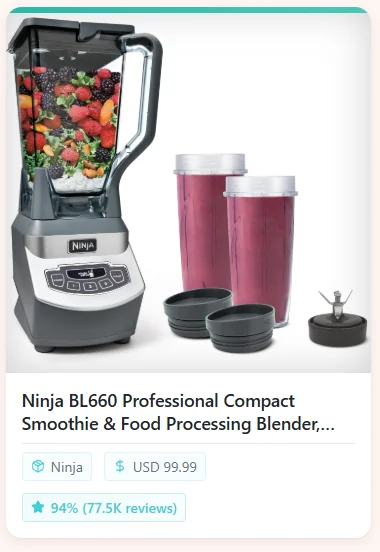
Linkflare recognizes product-type bookmarks automatically and fills in structured fields: price, retailer name, product description, and availability status. When a price changes after you save the item, Linkflare can flag the update, so you and the person buying for you always see the current cost.
Not everything on a wishlist is buyable online. Experiences, services, and intangible gifts go on the list too: add them by hand, with a custom description and any image you find. "A home-cooked meal," "a road trip together," and "an afternoon at the spa" all work.
Setting Priorities and Adding Context
Priorities and notes turn a list of links into clear guidance for the people buying gifts.
Each item can carry more than a link:
- Priority rating: Rate each item from one to five stars. A five-star rating signals "I really want this"; one star means "nice but not urgent." Givers can sort by priority to find the most meaningful items quickly.
- Notes field: Add context the product page doesn't capture. For clothing that means your size and color preference; for books, why it's on your list; for experiences, your timing or location preferences.
- Tags: Apply hierarchical tags like
#wishlist/clothing/winteror#wishlist/tech/home-office. Tags let you filter your list by category and help buyers who know your interests but want to stick to a theme. - Price range visibility: Since Linkflare captures the price automatically, givers can sort your list by price to find something within their budget without awkwardly asking.
Think of your wishlist notes as a letter to the person shopping for you. The more context you provide (size, color, why you want it), the more likely you are to receive something you'll genuinely love.
You can also mark items as "purchased" once you receive them, which keeps the list current for the next occasion. That matters most on long-running wishlists, where the same item might otherwise be gifted twice.
Sharing Your Wishlist
Once your wishlist collection is ready, sharing it takes two clicks. Open the collection, select Share, and choose between a public link or an invite-only link for specific people.
Recipients open the shared link in any browser without a Linkflare account. They see a read-only view of your wishlist with product names, images, prices, priorities, and any notes you've added, and they can sort and filter it the way you can, which makes finding something within a specific budget straightforward.
Linkflare has four sharing options:
- Public link: Anyone with the link can view the list. Paste it into a family group chat, email it to friends, or add it to your social media bio in the weeks before your birthday.
- Invite by email: Share directly with specific people who receive a personalized invitation. Their access can be revoked at any time.
- Read-only access: Recipients can view and browse but cannot add, edit, or remove items. Your list stays exactly as you built it.
- Collaborative access: Grant edit permissions so a partner or close family member can help build the list. Useful for joint wishlists like a couple's home improvement list or a household item list for a new apartment.
For holiday wishlists, consider sharing the link in mid-November so family members have time to coordinate purchases. The built-in price sorting means even budget-conscious givers can find something meaningful without guessing.
For details on the full sharing system, including link expiry, QR code generation, and per-item visibility, see the Linkflare sharing documentation.
Private Mode: Wish Lists Only You Can See
Some wishlists are not meant to be shared, at least not yet. Linkflare's private mode protects entire collections behind a PIN or biometric lock, so they stay invisible even when someone else is using your device.
Private wishlists are useful in several situations:
- Surprise-proofing your own gifts: You want to track ideas for a partner's birthday without them accidentally seeing the list on your shared computer.
- Planning ahead: Build a holiday gift list in September and hide it until you're ready to share in November, with no early spoilers.
- Personal splurge tracking: Keep a "for me someday" list of high-value items without others assuming you're asking them to buy everything on it.
Private collections appear as a locked icon in your sidebar. You have to authenticate to open one, and they are left out of any shared or exported view. When you're ready to reveal a private wishlist, say on the morning of your birthday, one tap moves it out of private mode.
Using Linkflare to Find Gifts for Others
The same system that manages your own wishlist also helps you track gift ideas for the people in your life. Instead of scrambling for ideas every December, you can build ongoing collections for each person throughout the year.
Create a collection called "Gift Ideas / Mom" and save items as you encounter them across the year:
- A cooking book she mentioned at dinner in March
- A spa experience you saw advertised in May
- A pair of gardening gloves from her favorite brand in July
- A documentary series she'd enjoy on a streaming platform
Because Linkflare captures product prices automatically, you can filter the "Gift Ideas / Mom" collection by price when a gift-giving occasion arrives. Need something under $40? Filter by price. Want the items you've rated highest for her? Sort by priority.
Tags work especially well for gift tracking. Apply a tag like #recipient/mom or #recipient/best-friend to items across multiple collections. Then, when an occasion approaches, search that tag to see every idea you've saved for that person in one view, regardless of which collection it lives in.
Collaborative gift collections let families coordinate large presents without spoilers. Create a shared "Dad's 60th Birthday" collection, invite siblings, and each person adds ideas they're considering. Set access to read-and-write so anyone can mark items as "claimed" once they've committed to buying, which stops duplicate gifts and the round of texts asking who's getting what.
Wishlists for Every Occasion
One Linkflare account covers every occasion and relationship. Users typically organize their collections like this:
- Birthday wishlist: Update every autumn with 10 to 15 items across a range of price points. Share in the month before your birthday. Mark items as received after the celebration.
- Holiday wishlist: A separate collection with season-specific items. Share in November, expire the link in January. Archive rather than delete so you have a record of what you received each year.
- Wedding registry: Create a main registry collection with sub-lists for kitchen, bedroom, and garden. Share the top-level collection publicly. Guests see organized categories without a cluttered single-page list.
- Baby registry: Similar to a wedding registry: a main collection with sub-lists for nursery, clothing, travel, and safety. Collaborative access lets a co-parent contribute and mark items as purchased.
- Home improvement: A joint wishlist for a couple or household tracking furniture, appliances, and renovation materials. Useful for comparing options side by side before committing to a purchase.
- Personal bucket list: Experiences, trips, and goals rather than products. Keep this one private until the moment feels right to share.
Every collection type can use Linkflare's organizational tools: custom icons, color labels, hierarchical nesting, and smart sorting. A wedding registry looks different from a birthday wishlist at a glance, which cuts confusion when family members are browsing multiple lists from the same person.
How Linkflare Compares to Other Wishlist Apps
Dedicated wishlist apps like Amazon Wish List, Wishlistr, Giftster, and MyRegistry each do part of the job. Linkflare does all of it from within a platform you likely already use for other bookmarking tasks.
| Feature | Linkflare | Amazon Wish List | Giftster |
|---|---|---|---|
| Save from any store | ✓ | Partial | ✓ |
| Save non-product items (experiences, books, media) | ✓ | ✗ | Partial |
| Private / hidden mode | ✓ | ✗ | ✓ |
| Multiple lists for different occasions | ✓ | ✓ | ✓ |
| Priority and notes per item | ✓ | Partial | ✓ |
| Collaborative (multiple editors) | ✓ | ✗ | ✓ |
| Doubles as a full bookmark manager | ✓ | ✗ | ✗ |
| Browser extension (Chrome, Firefox, Safari) | ✓ | Chrome only | ✗ |
The difference is scope. Amazon Wish List is optimized for Amazon, and Giftster for gift coordination between family groups. Linkflare is optimized for saving and organizing anything, and wishlists are one of the most natural things to save.
If you already use Linkflare to save articles, recipes, or reading lists, adding a wishlist collection costs you nothing extra. Your wishlist lives alongside everything else you've saved, searchable with the same tools, sharable with the same one-click system.
Keeping Your Wishlist Fresh and Useful
A wishlist is only useful if it reflects what you want right now. Stale lists frustrate the people trying to buy gifts: nobody wants to order something you already bought yourself six months ago.
A few habits keep your Linkflare wishlist current:
- Add items as you encounter them: The browser extension is there for this. When you see something you want, save it immediately instead of relying on memory.
- Review quarterly: Set a reminder every three months to open your wishlist and remove anything you've bought, no longer want, or feel has dropped in priority.
- Update notes and sizes: If your clothing size changes or your preferences shift, update the notes on relevant items before sharing a new season's list.
- Archive, don't delete: Move received items to an "Archived" sub-collection rather than deleting them. This creates a personal gift history you can reference when someone asks "what did I give you last year?"
Linkflare's smart sorting can surface items you haven't opened recently, which makes review and pruning faster. Filter by date added to see what's been sitting on your list the longest: those are either things you really want or things you should remove.
Getting Started: Build Your First Wishlist in 5 Minutes
Replacing scattered screenshots and Amazon lists with one organized wishlist takes six steps.
- Create a free account at linkflare.io.
- Create a new collection and name it for your first occasion (e.g., "Birthday 2026").
- Install the browser extension so you can save products from any site with one click.
- Browse any online store (Amazon, Etsy, a clothing brand, a local shop) and save 5 to 10 items to your collection.
- Add priorities and notes to each item so the people shopping for you have real context.
- Share the collection link with whoever needs it. They view a clean, sorted list in their browser with no account required.
For gift tracking, create a second collection for someone you shop for regularly: a parent, partner, or close friend. Save ideas throughout the year with the same extension. When their birthday or a holiday arrives, open the collection, filter by price, and choose from your own shortlist instead of scrambling at the last minute.
🎁 Pro tip: Enable private mode on your gift tracking collections so no one accidentally stumbles on their own surprise.
Frequently Asked Questions
What is the best free wishlist app in 2026?
How do I create an online wishlist from any store?
How do I share my wishlist online?
What is a wishlist maker?
Can I use Linkflare as a wedding registry or baby registry?
Stop losing track of what you want
Create your wishlist in Linkflare and share it with the people who love you. No app downloads required on their end.
Start Your Wishlist for FreeKeep Reading
Introducing Linkflare: The Universal Bookmark Manager
Learn how Linkflare handles wishlists, recipes, reading lists, and more in one place.
The Ultimate Recipe Saver
Another use case for Linkflare's universal saving: every recipe from any site in one organized place.
Best Bookmark Managers in 2026
Compare the top tools for organizing your links, research, and digital collections.
The Best Read It Later Apps in 2026
Save articles and videos for distraction-free reading whenever you have time.