Best Chrome New Tab Page Extensions in 2026
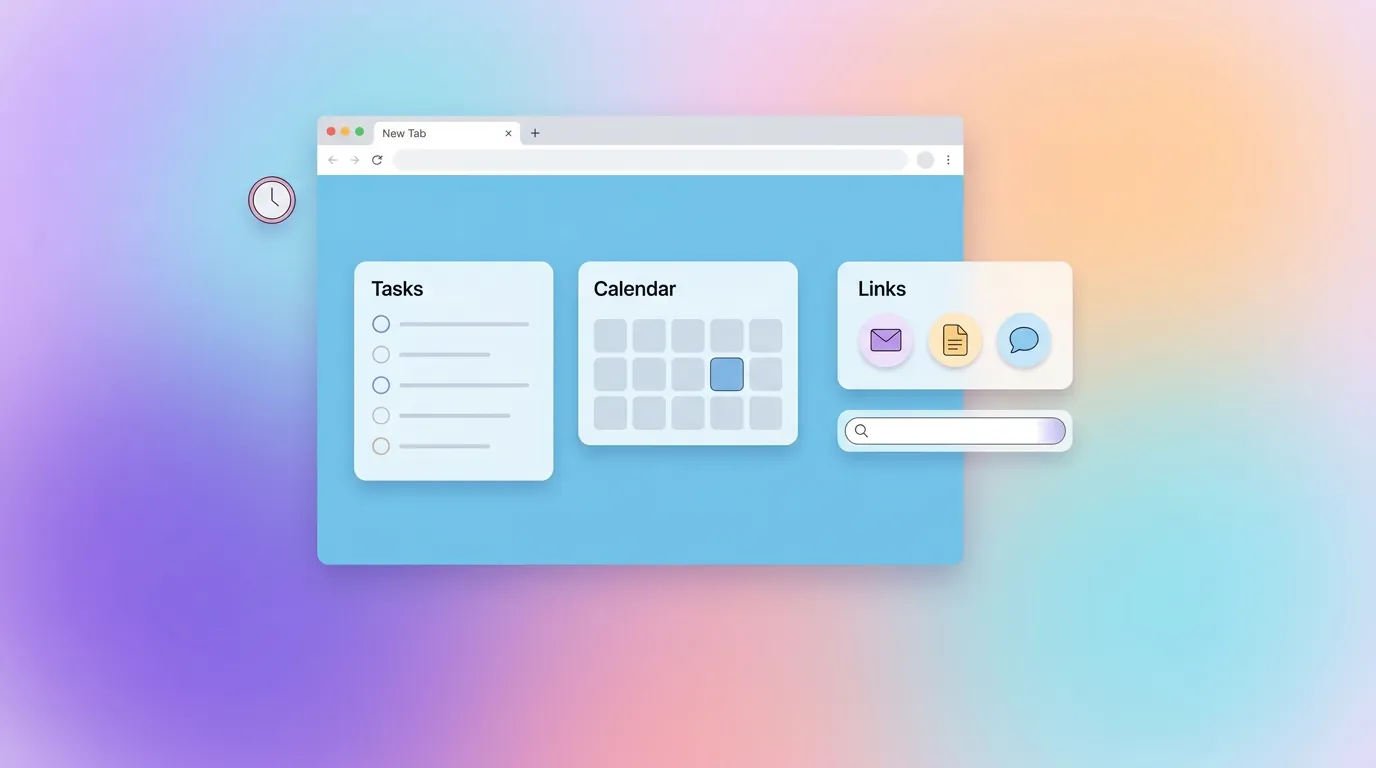
Every time you open a new tab, your browser gives you a blank page, or worse, a cluttered grid of thumbnails you never asked for. That's dozens of wasted moments a day. The best Chrome new tab page extensions turn that dead space into a personal dashboard that keeps your bookmarks visible, helps you get more done, and can hand you beautiful new tab wallpapers on the way.
We tested over a dozen new tab extensions across Chrome, Edge, and Firefox to find the ones worth installing. Whether you want an aesthetic new tab with a minimal focus timer, a full bookmark manager, or a customizable start page with widgets, this guide covers it. It also walks through how to change your new tab page in Chrome, Edge, Firefox, and Safari, step by step.
How to Change Your New Tab Page in Chrome, Edge, Firefox & Safari
If you've ever wondered how to change your start page in Chrome or how to set a custom new tab page, here's the step-by-step for every major browser.
Chrome: Change New Tab Page
Chrome's built-in chrome start page settings are limited: you can only choose between Google's default page or a blank tab. To really customize your Chrome new tab page, you need an extension:
- Visit the Chrome Web Store and search for "new tab"
- Choose an extension (like Linkflare) and click Add to Chrome
- Open a new tab and you'll see a prompt asking if you want to keep the new page
- Click Keep it to confirm your new start page
To revert, go to chrome://extensions, find the extension, and toggle it off or remove it. Your Chrome start page will return to the default. You can also adjust behavior in Chrome Settings → On Startup to control what happens when you launch the browser.
Edge: Set a Custom New Tab Page
Microsoft Edge shares Chrome's architecture, so most Chrome new tab extensions work in Edge too. To set a custom new tab in Edge:
- Go to
edge://extensionsand enable Allow extensions from other stores - Install the extension from the Chrome Web Store or the Edge Add-ons store, for example Linkflare for Edge, which works well
- Open a new tab and Edge will ask you to confirm the override
Edge's built-in new tab is more feature-rich than Chrome's (with a news feed and quick links), but it's cluttered and not customizable beyond Microsoft's options. A dedicated extension gives you full control.
Firefox: Change Your New Tab
Firefox handles new tab extensions slightly differently. Install from addons.mozilla.org (Linkflare is available for Firefox too) and the extension automatically overrides your new tab. Firefox also lets you set a custom homepage URL in Settings → Home, though extensions give you far more.
Safari: Customize Your Start Page
Safari on macOS supports extensions via the Mac App Store. To set a custom new tab page in Safari:
- Install a Safari extension from the Mac App Store, for example Linkflare for Safari
- Open Safari → Settings → Extensions and enable the extension
- Open a new tab to see your customized start page
Safari's built-in start page shows Favorites, Frequently Visited, and Reading List, but a dedicated extension gives you a fully customizable dashboard with your bookmarks and collections.
What Makes a Great New Tab Extension?
Not all new tab extensions are created equal. We judged each one on five criteria:
- Speed: A new tab must load instantly. If it takes more than half a second, it feels broken. Extensions that cache data locally and render immediately score highest.
- Useful content: Pretty wallpapers are nice, but do they help you get things done? The best extensions surface your content (bookmarks, tasks, feeds) instead of stock photos.
- Customization: No two users want the same dashboard. Toggle sections on and off, choose layouts, pick your own backgrounds.
- Cross-browser support: Your workflow shouldn't change just because you switch browsers. Chrome, Edge, Firefox, and Safari support matters.
- Privacy: Your browsing data is sensitive. Extensions that don't collect data or sell it to third parties get extra points.
The 7 Best New Tab Extensions for Chrome in 2026
Here's the ranked list, from the most complete option down to focused niche picks.
1. Linkflare: Best New Tab for Bookmark Lovers & Productivity
Users: Growing | Rating: New | Price: Free (Pro from $4.99/mo) | Browsers: Chrome, Edge, Firefox, Safari
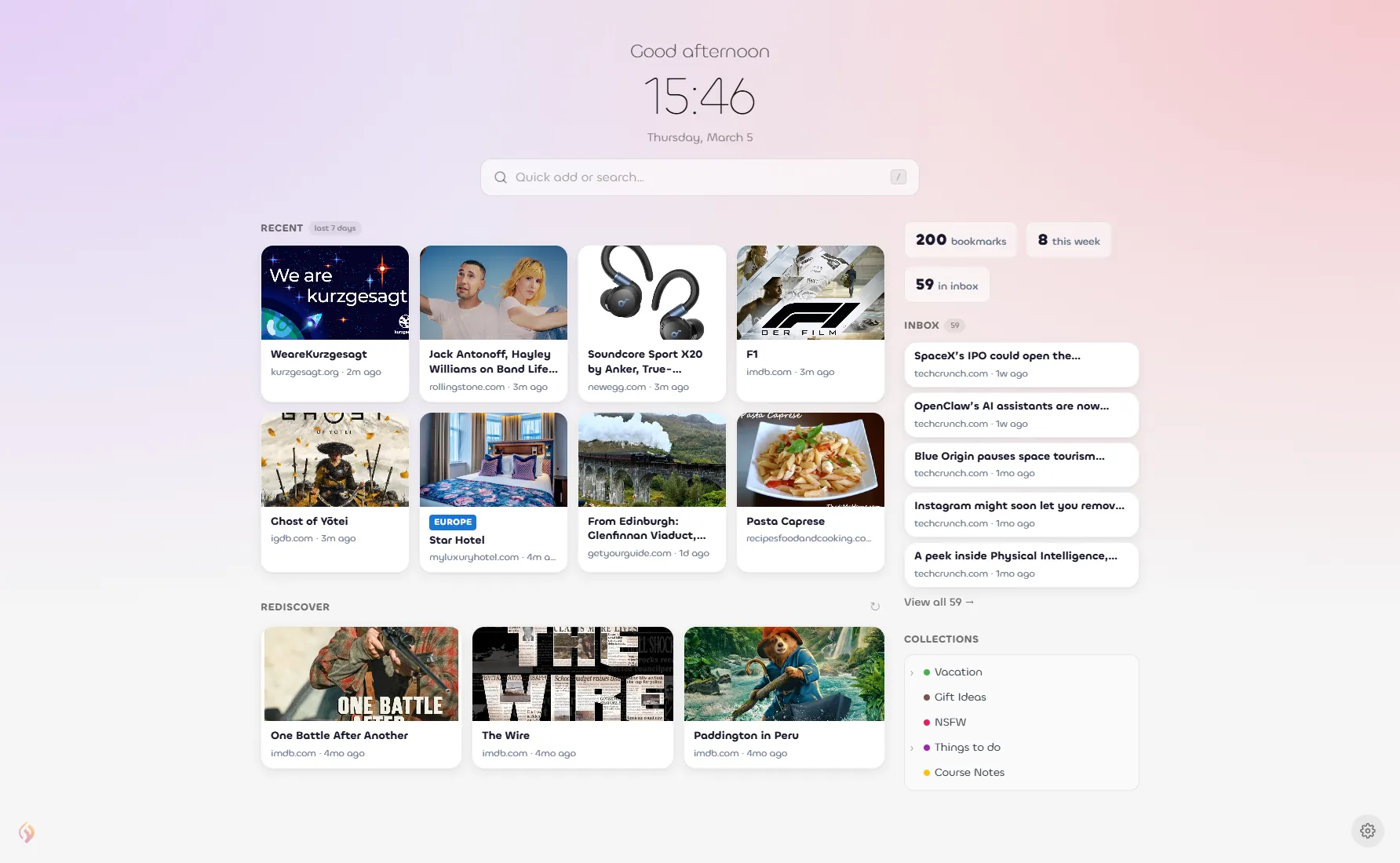
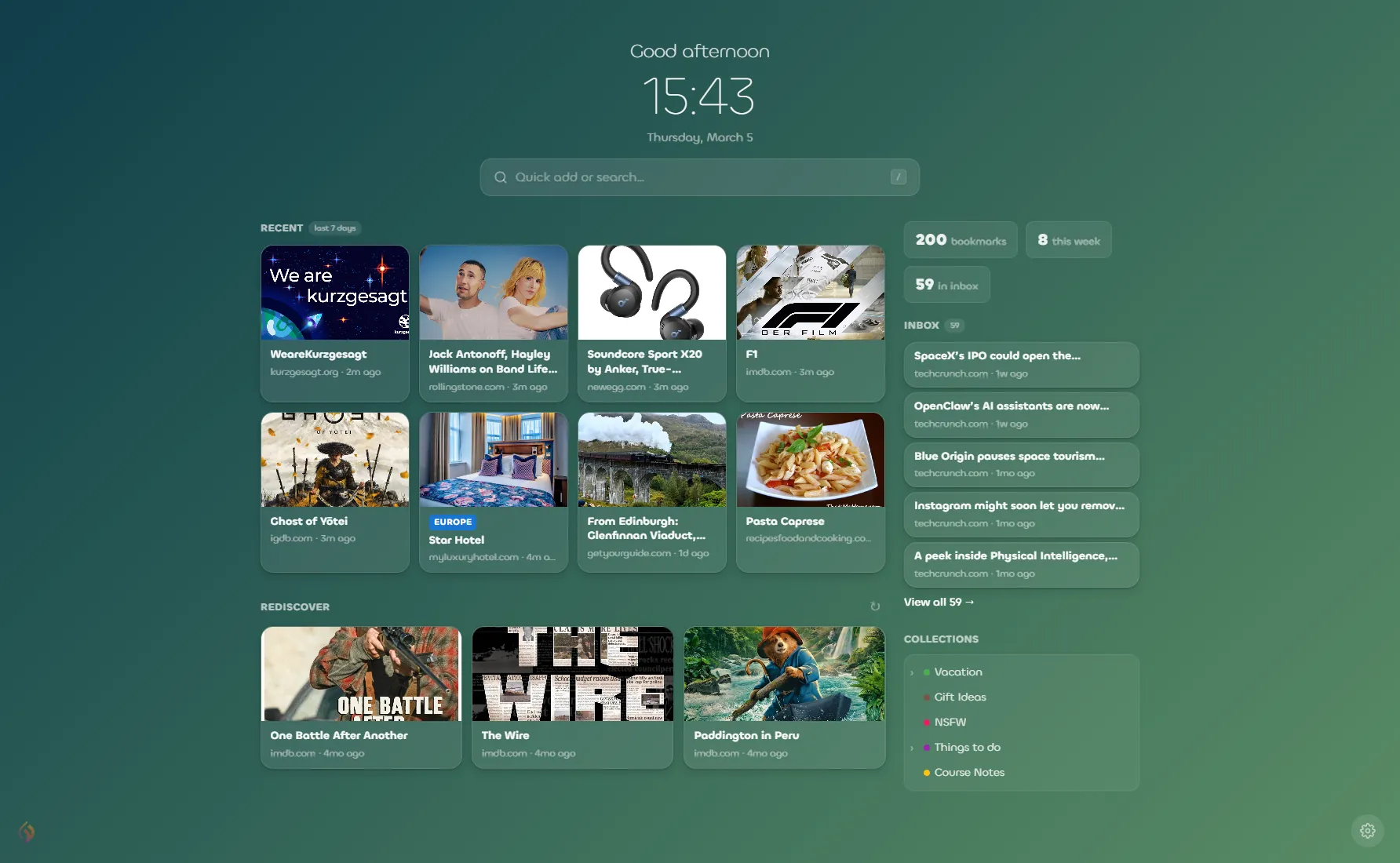
Linkflare is the only new tab extension that doubles as a full-featured bookmark manager. Every time you open a new tab, your entire digital library is there at a glance: recent bookmarks with rich previews, your inbox queue, pinned links, and a hierarchical collection tree.
What sets Linkflare apart from every other new tab extension:
- Smart bookmarks with auto-enriched metadata: Save a movie link and Linkflare pulls in the IMDb rating, poster, and release year. Save a recipe and it extracts cooking time, calories, and ingredients. Books get covers and author info. No other new tab extension does this.
- Inbox workflow: A built-in “read later” / “watch later” queue visible right on your new tab. Other extensions have to-do lists for generic tasks; Linkflare gives you a media inbox tailored to your content types.
- Quick Add bar: Paste any URL to save it instantly, or type text to search your library. Press
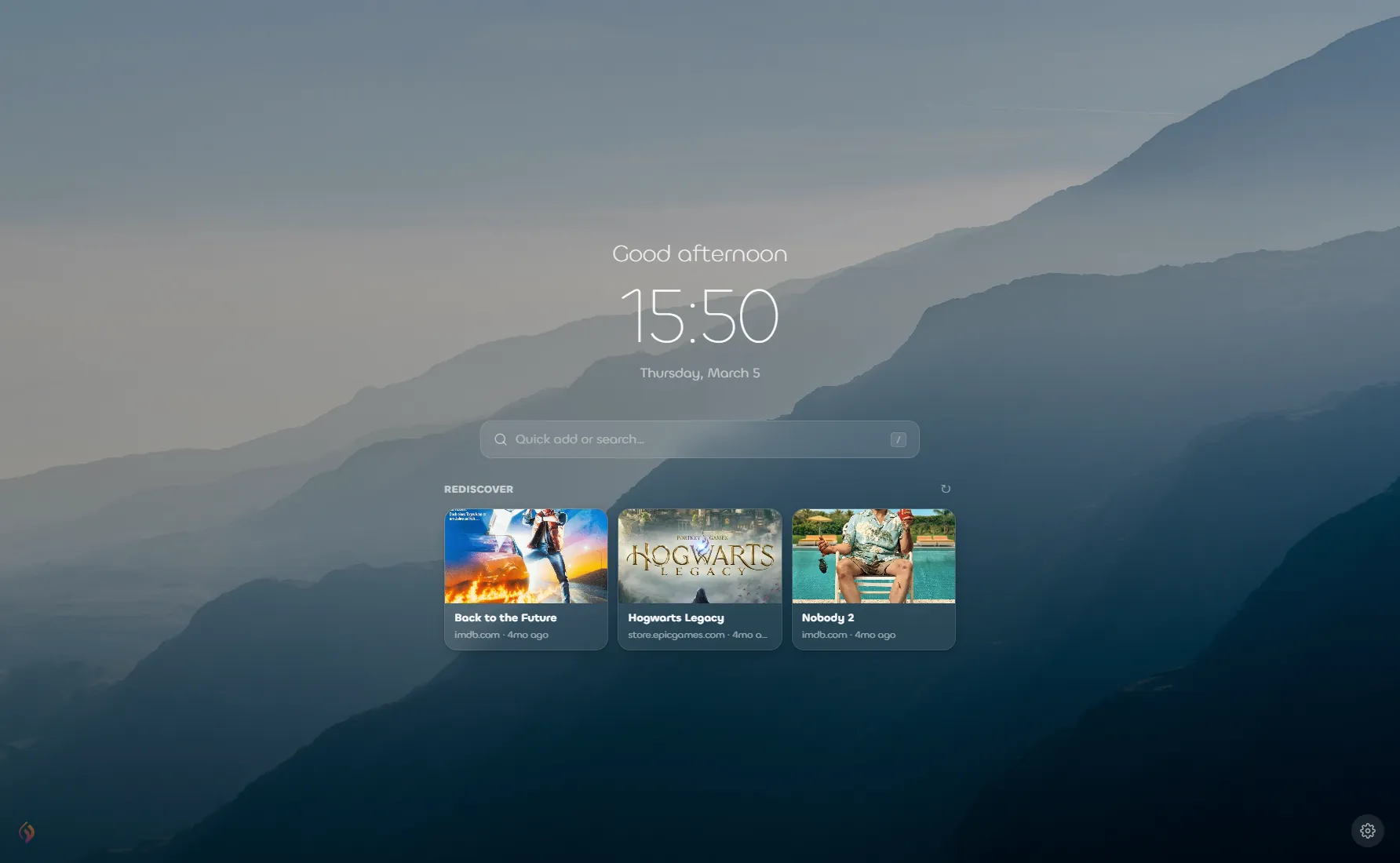
/to focus it from anywhere on the page (see all keyboard shortcuts). - Rediscover: Three random bookmarks you've forgotten about, with a shuffle button to nudge you back toward content that matters.
- Two layout modes: A full Dashboard Grid with sidebar and sections, or a Minimal Focus mode inspired by Momentum, with a centered greeting, clock, and search. Switch between them in one click.
- Collection tree: Browse your entire folder hierarchy right from the new tab. Click any collection to open the full app filtered to it.
- Feed subscriptions: Auto-import from RSS feeds and newsletters into your inbox, visible on your new tab.
- 15 curated backgrounds + custom image upload + solid colors, with an overlay darkness slider for readability.
Who it's for: Anyone who saves content across the web (readers, researchers, trip planners, recipe collectors, movie trackers) and wants every new tab to reconnect them with what they saved. If you already use a bookmark manager, Linkflare makes your new tab useful instead of decorative.
Try Linkflare's New Tab
Install the extension and your next new tab becomes a personal dashboard for everything you've saved online.
Get the extension →2. Momentum: Best for Minimalist Inspiration
Users: 3M+ | Rating: 4.5/5 (13.8K reviews) | Price: Free + Plus subscription | Browsers: Chrome, Edge, Firefox, Safari
Momentum is the most popular new tab extension for a reason. It replaces your new tab with a daily photograph, a motivational quote, and a single focus question: "What is your main focus for today?" It's calm and deliberately minimal, the quintessential aesthetic new tab Chrome extension.
Key features:
- Daily background photos and mantras
- Focus Mode to block distractions
- Simple to-do lists and website shortcuts
- Weather widget and search bar
- Plus: Soundscapes, Tab Stash, integrations with Todoist/Asana/ClickUp, Notes AI
Limitations: Momentum is primarily a motivational tool, not a productivity one. It doesn't show your bookmarks, has no read-later queue, and the free tier is quite limited. The Plus subscription unlocks most of the useful features. If you want inspiration, Momentum is excellent. If you want to actually do something from your new tab, you'll quickly outgrow it.
Who it's for: People who want a calm, photo-driven start to each browsing session and use a separate task manager for real work.
3. Start.me: Best for RSS Feeds & News Junkies
Users: 350K+ | Rating: 4.3/5 (1.4K reviews) | Price: Free + paid plans | Browsers: Chrome, Edge, Firefox
Start.me turns your browser start page into a widget-packed command center, a Chrome dashboard on steroids and an ultra-customizable iGoogle replacement. With 3,500+ widgets including live RSS feeds, weather, stock quotes, calendars, and embedded web content, it's the most feature-dense option on this list.
Key features:
- 3,500+ widgets including calendars, stock tickers, and embedded pages
- Live RSS feed display from any source
- Drag-and-drop bookmark organization
- Shareable and collaborative pages (great for teams and classrooms)
- Works across all browsers via web app
Limitations: The sheer number of options can be overwhelming. The interface feels utilitarian, more "power user control panel" than "design-forward dashboard." Loading can be slow when you have many widgets active. There's no built-in bookmark enrichment (movie ratings, recipe data, and so on), so your links are just links.
Who it's for: News readers, OSINT researchers, and teams who want a shared information dashboard rather than a personal bookmark tool.
4. Tabliss: Best Free & Open-Source Option
Users: 100K | Rating: 4.7/5 (380 reviews) | Price: 100% Free | Browsers: Chrome, Edge, Firefox
Tabliss is a beautiful new tab extension and a no-strings alternative to Momentum. It's completely free, with no ads, no subscriptions, and no data collection. The open-source project is community-built and has millions of Unsplash backgrounds, animated GIPHY wallpapers, and a pile of useful widgets.
Key features:
- Millions of backgrounds via Unsplash and GIPHY
- Widgets: clock, weather, greetings, quotes, to-do, quick links, search, GitHub contributions, NBA scores
- Custom CSS for advanced styling
- 40+ language translations
- Requires zero permissions, so it stays fully private
Limitations: Tabliss is a wallpaper-and-widgets tool. There's no bookmark management, no inbox, no collections, and no metadata enrichment. It hasn't been updated since April 2022, though the community keeps improving it on GitHub. It's great as a lightweight, pretty landing page but lacks the depth for serious productivity users.
Who it's for: Privacy-conscious users who want a beautiful, free, no-nonsense new tab page without signing up for anything.
5. Infinity New Tab: Best Speed Dial & Icon Launcher
Users: 400K+ | Rating: 4.6/5 (11.8K reviews) | Price: Free + Pro | Browsers: Chrome
Infinity New Tab reimagines the new tab as a speed dial: a grid of flat-design icons linking to your most-used sites. It's the spiritual successor to Opera's original Speed Dial, wrapped in a modern UI with HD wallpapers that rotate daily.
Key features:
- 200+ curated flat icons for popular sites
- 365 hand-picked daily HD wallpapers
- Gmail notifications, to-do list, notepad
- History management and extension launcher
- Cloud sync for backup and recovery
Limitations: Infinity hasn't evolved much beyond the speed-dial concept. There's no bookmark management, no read-later queue, no content enrichment, and limited widget options compared to Start.me or Linkflare. It's Chrome-only, and the Pro version locks some wallpapers and features behind a paywall. Still, if you want a clean icon grid to launch your top 20 sites, it does that job well.
Who it's for: Users who mainly want quick visual shortcuts to their most-visited sites, with a clean aesthetic.
6. Home — New Tab Page: Best for Notification Badges
Users: 60K+ | Rating: 4.4/5 (9.8K reviews) | Price: Free | Browsers: Chrome
Home is one of the longest-running new tab replacements. Its standout feature is live notification badges: unread counts for Gmail, Outlook, Yahoo Mail, and Facebook Messages appear right on the site icons in your new tab grid. It also recently added ChatGPT-powered search.
Key features:
- Unread badges for Gmail, Outlook, Facebook, Yahoo
- ChatGPT / GPT-4o search integration
- Quick Notes panel with rich text formatting
- Weather widget with 5-day forecast
- Focus mode for a clean, distraction-free view
- Bookmark browser tree panel
Limitations: The design feels dated compared to modern alternatives. The notification badges only support a handful of services. It's Chrome-only, and some users report occasional slowness. There's no content enrichment, no inbox workflow, and the "bookmark browser" just mirrors your native browser bookmarks rather than offering its own management system.
Who it's for: Users who want a unified inbox-notification view across email and social services, right on their new tab.
7. Anori: Best Widget-Based Customizable New Tab
Users: Growing | Rating: 4.6/5 | Price: Free | Browsers: Chrome, Edge, Firefox
Anori takes a modular approach: compose your own new tab page from a library of widgets. Drag and resize blocks for bookmarks, notes, weather, clocks, calendar, system monitor, and more. It's like building your own dashboard from Lego pieces.
Key features:
- Drag-and-drop widget grid with resizable blocks
- Multiple pages/tabs within the new tab
- Calendar, system monitor, and RSS widgets
- Custom backgrounds and themes
- Open-source and cross-browser
Limitations: The widget approach means you build everything from scratch, with no guided experience out of the box. There's no bookmark enrichment and no read-later queue, and the widget selection, while growing, is still limited compared to Start.me. It's best for tinkerers who enjoy configuring their setup.
Who it's for: Power users and tinkerers who want maximum layout flexibility and enjoy customizing every pixel.
New Tab Extension Comparison Table
Here's how the top new tab extensions stack up head-to-head:
| Feature | Linkflare | Momentum | Start.me | Tabliss | Infinity | Home | Anori |
|---|---|---|---|---|---|---|---|
| Full bookmark manager | ✓ | ✗ | Basic | ✗ | ✗ | Browser only | ✗ |
| Smart metadata (movies, books, recipes) | ✓ | ✗ | ✗ | ✗ | ✗ | ✗ | ✗ |
| Read / watch later inbox | ✓ | ✗ | ✗ | ✗ | ✗ | ✗ | ✗ |
| Collection / folder tree | ✓ | ✗ | Sections | ✗ | ✗ | Browser tree | ✗ |
| RSS / feed subscriptions | ✓ | ✗ | ✓ | ✗ | ✗ | ✗ | Basic |
| Beautiful backgrounds | ✓ | ✓ | ✓ | ✓ | ✓ | ✓ | ✓ |
| To-do / tasks | ✗ | ✓ | ✓ | ✓ | ✓ | ✗ | ✓ |
| Weather widget | ✗ | ✓ | ✓ | ✓ | Basic | ✓ | ✓ |
| Quick Add / URL save | ✓ | ✗ | ✓ | ✗ | ✗ | ✗ | ✗ |
| Rediscover random bookmarks | ✓ | ✗ | ✗ | ✗ | ✗ | ✗ | ✗ |
| Minimal focus mode | ✓ | ✓ | ✗ | ✗ | ✗ | ✓ | ✗ |
| 100% free tier | ✓ | Limited | ✓ | ✓ | Limited | ✓ | ✓ |
| Chrome + Edge + Firefox | ✓ | ✓ | ✓ | ✓ | Chrome only | Chrome only | ✓ |
Best New Tab Wallpapers & Background Customization
A new tab wallpaper is often the first thing people look for when choosing a new tab extension, and a good background sets the mood for a browsing session. Here's how the popular extensions handle new tab backgrounds:
- Momentum delivers a single curated high-res photo each day, hand-picked by their team. You can't browse or search, so you get what you get. Plus subscribers can upload their own.
- Tabliss connects to Unsplash's library of millions of photos, plus GIPHY for animated backgrounds. You can filter by search terms (e.g., "mountains" or "ocean") for a personalized feed.
- Infinity New Tab rotates through 365 hand-picked HD wallpapers, one per day, or lets you upload from your device.
- Linkflare has 15 curated CSS gradient themes (fast-loading, no external image requests), custom image upload, and solid color options. The standout is the overlay darkness slider: dim any background until the text on top is readable, without losing the look of it. That matters when your new tab carries content you need to read (bookmarks, collections) rather than a photo to glance at.
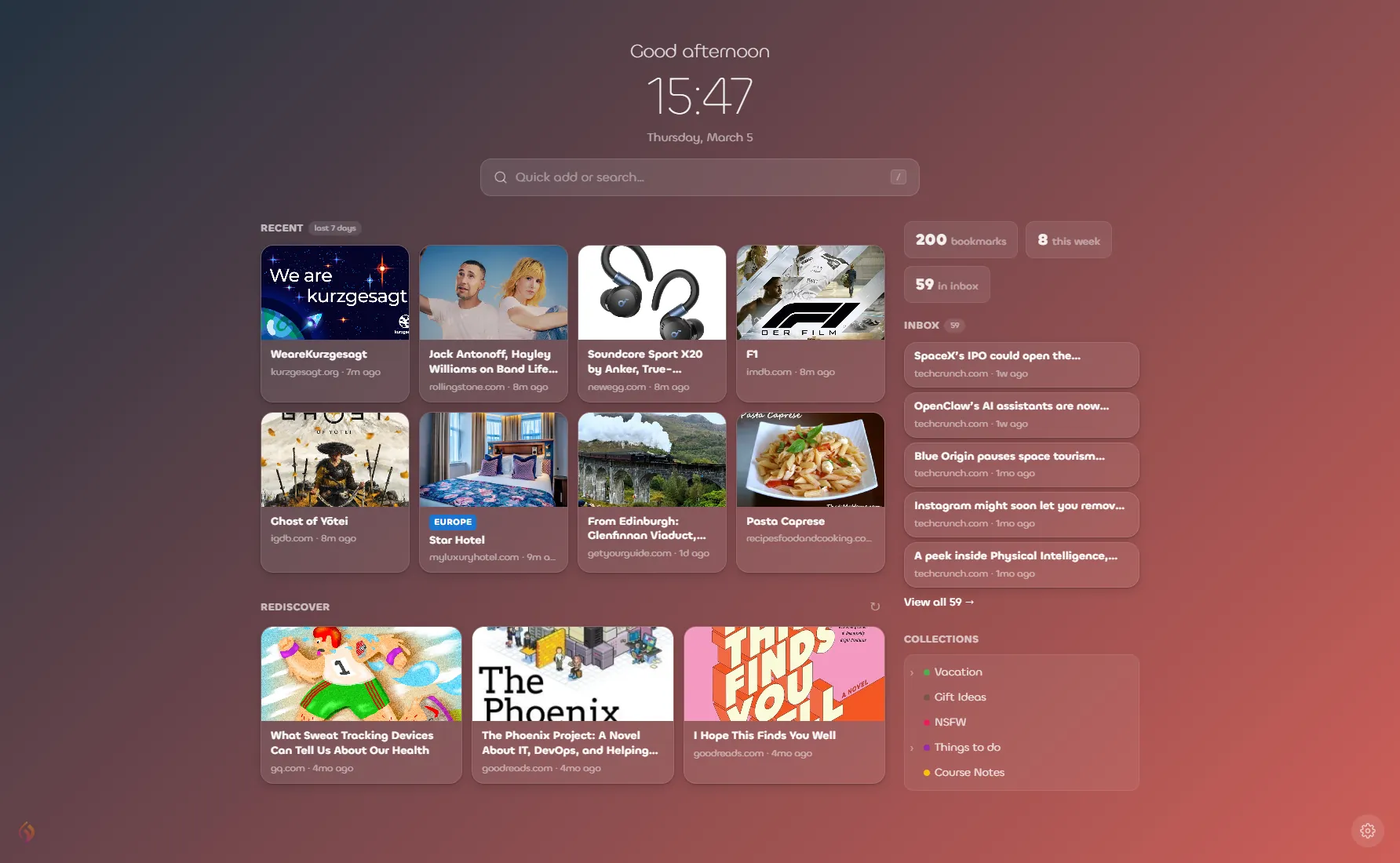
Linkflare's curated gradient themes: choose from 15 backgrounds or upload your own.
If eye candy is your top priority, Tabliss + Unsplash is hard to beat. If you want a background that still lets you read your bookmarks and inbox while you look at it, Linkflare's gradient + dimming system is the more practical choice, because a nature photo is useless when you can't read the text on top of it.
Why Linkflare's New Tab Is Different
Most new tab extensions fall into one of two camps:
- Pretty wallpaper + motivational quote: Momentum, Tabliss, and Infinity are decorative. They look good, but they don't help you manage your digital life.
- Widget dashboards: Start.me, Anori, and Home pile on generic widgets (weather, calendar, news). They're functional, but they aren't connected to your content.
Linkflare is in a category of its own: a content-first new tab. What that means in practice:
Your Bookmarks, Front and Center
Every time you open a new tab, you see the links you've actually saved, with rich card previews showing images, titles, and enriched metadata. A recipe shows its cooking time, a movie shows its IMDb rating, a book shows its cover. No other new tab extension does this much automatic enrichment.
An Inbox That Clears Itself
Your Linkflare Inbox shows unprocessed items right on your new tab: articles to read, movies to watch, books to check out. Process an item and it moves to your permanent library. The inbox count badge nudges you back toward content you cared enough to save. It's a content consumption workflow for readers, watchers, and digital collectors, which is a different thing from a generic to-do list. If you're switching from Pocket, see our guide to the best Pocket alternatives.
Rediscover What You've Forgotten
The “Rediscover” section shows three random bookmarks from your library with a shuffle button. Over time a library grows into hundreds or thousands of links, and most bookmark managers let them collect dust. Linkflare's new tab resurfaces them, so it works as a recommendation engine built from your own past interests. See how Linkflare compares in our Linkflare vs. Raindrop.io deep-dive.
Two Modes, One Extension
Want the full dashboard with sidebar, collections, recent links, inbox, and stats? Use Dashboard Grid mode. Having a hectic morning and just need a clean surface? Switch to Minimal Focus mode, a Momentum-inspired view with a greeting, clock, search bar, and a few pinned links. You get both in one extension, switchable in one click.
Instant Load, No Spinner
Linkflare's new tab uses a cache-first architecture. Your bookmarks, collections, and settings are stored locally and rendered instantly. Fresh data syncs from the server in the background. The result: your new tab appears in under 200ms, even on slow connections, with no loading spinner and no blank screen.
Productivity Tips for Your New Tab Page
No matter which Chrome productivity extension you choose, these habits will help you get the most from your new tab:
- Pin your top 5 links. Don't make yourself search for the sites you visit 10 times a day. Pin them to your new tab for one-click access. In Linkflare, pinned links appear as a horizontal row right below the greeting.
- Use the Quick Add bar as a launcher. Instead of typing in the address bar, use your new tab's search or Quick Add feature. In Linkflare, press
/to focus the Quick Add bar, paste a URL to save it, or type any text to search your library. - Process your inbox daily. If your new tab has an inbox or read-later queue, spend 5 minutes at the start of each day clearing it. Archive what you've consumed and delete what's stale.
- Disable sections you don't use. If you never check the weather, hide the weather widget. If stats aren't motivating, toggle them off. A focused new tab beats a cluttered one.
- Try the minimal view on meeting-heavy days. When you're in back-to-back meetings and just need to quickly check something, switch to a minimal/focus view. Linkflare and Momentum both offer this.
- Set up feeds for passive discovery. Subscribe to blogs and newsletters through your new tab's feed feature (available in Linkflare and Start.me). New content appears in your inbox without you visiting each site.
Frequently Asked Questions
What is the best new tab extension for Chrome in 2026?
Linkflare is the best new tab extension for Chrome in 2026. It combines a full bookmark manager with a customizable Chrome dashboard that shows your recent bookmarks, inbox queue, collection tree, and auto-enriched metadata for movies, recipes, and books. It also works on Edge, Firefox, and Safari.
How do I change my new tab page in Chrome?
To customize your Chrome new tab, install an extension from the Chrome Web Store (like Linkflare or Momentum), then open a new tab and click “Keep it” when prompted. To revert, go to chrome://extensions and disable or remove the extension. See our step-by-step guide above for Chrome, Edge, and Firefox.
Are new tab extensions safe to use?
Most popular new tab extensions are safe, but always check permissions before installing. Look for extensions that request minimal permissions, have good reviews, and transparent privacy policies. Tabliss and Linkflare are among the most privacy-friendly options, requiring minimal data access.
Can I use the same new tab extension on Chrome, Edge, and Firefox?
Yes. Several new tab extensions work across all three browsers. Linkflare, Momentum, Tabliss, Start.me, and Anori all support Chrome, Edge, and Firefox. Linkflare also supports Safari. Infinity New Tab and Home are Chrome-only. Check out our comparison table for a full browser-support breakdown.
What is the best free new tab extension?
Tabliss is the best completely free and open-source new tab extension with no paid tier at all. Linkflare has a generous free tier with the full new tab dashboard included, and you only need Pro for advanced features like feed subscriptions and vault storage. Momentum's free tier is more limited, locking many features behind its Plus subscription.
The Bottom Line
If you just want a pretty picture when you open a new tab, Momentum and Tabliss are solid choices. If you want a news and widget command center, Start.me wins. If you want your new tab to be genuinely useful, showing the bookmarks you've saved, the content you need to process, and forgotten gems from your library, Linkflare is the best new tab extension in 2026.
It's the only new tab that doubles as a full bookmark manager with smart metadata, an inbox workflow, collection navigation, feed subscriptions, and a beautiful, fast-loading interface. You get the aesthetic appeal of Momentum and the encyclopedic depth of a dedicated bookmark tool.
Ready to make every new tab count?
Install Linkflare's browser extension and turn your new tab into a personal dashboard for everything you save online.
Keep Reading
Best Bookmark Managers in 2026
Compare the top bookmark managers to streamline your browsing.
Best Read It Later Apps in 2026
Pocket shut down in 2025. Find the best alternative for your reading queue.
Top 7 Pocket Alternative Apps
Pocket is gone. Here are the best replacements in 2026.
Linkflare vs. Raindrop.io
A deep-dive comparison of two powerful bookmark managers.