Documentation Menu
Automation Rules
Save time by letting Linkflare organize your bookmarks for you.
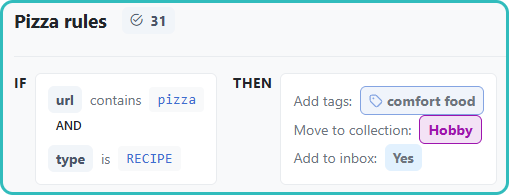
How it Works
You can create rules that automatically apply tags or move bookmarks to collections based on their properties.
Go to Settings → Manage Rules to manage your automation rules.
Rule Structure
A rule consists of a Condition and an Action.
Conditions
- URL: If the URL contains a specific word (e.g., "booking").
- Type: If the content type is Article, Video, etc.
Actions
- Add Tag: Apply one or more tags.
- Set Collection: Move the bookmark to a specific collection.
- Set Inbox Status: Move to Inbox.
Examples
Vacation Planning
If URL contains booking
Then add tag #vacation
Read Later
If Type is Article
Then add to Inbox
YouTube Organizer
If Domain is youtube.com
Then add tag #video